Sprint Hosting
  • 0 Shopping Cart
  • Home
  • Store
    • Browse All
    • Web Hosting
    • Register a New Domain
  • Announcements
  • Knowledgebase
  • Network Status
  • Contact Us
  • More
  • Account
    • Login
    • Forgot Password?
  1. Portal Home
  2. Knowledgebase
  3. Mail Filters & SPAM
  4. How to Edit "User Level Email Filter" in cPanel?

  Categories

Backup/Restore
4
cPanel - Control Panel
25
Databases
11
DNS - Nameservers
6
Domain Management
10
Email
13
FTP
9
Mail Filters & SPAM
9
Mobile
11
Others
5
Security
10
Softaculous
76
SSL
5
WordPress
17

  Categories

  Tag Cloud

2FA Box Trapper configuration cPanel Backups cPanel Restore DNS email FTP FTP Backup GDPR HotLink Protection htaccess IP Block Nameservers Password Payment Methods Plugins Redirect Security settings SPAM Subdomain Themes webmail WordPress

  Support

My Support Tickets
Announcements
Knowledgebase
Downloads
Network Status
Open Ticket

How to Edit "User Level Email Filter" in cPanel? Print

  • SPAM
  • 0

1. Log into your cPanel account.

2. In the Email, section click on Email Filters Icon.


3.
Under Filters by Users, You can see all of your existing email accounts, Click on Manage Filters next to the appropriate one.


4. Under Current Filters, You can see all of your existing filters, Click on Edit next to the appropriate one.
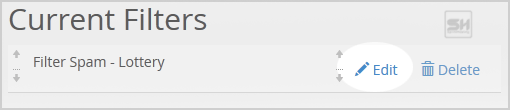

5. Make the desired changes to the filter.

6. Click on the Save Button.


Was this answer helpful?

Related Articles

Email Configuration Configuring Email in your Devices and Software. No matter what device or what software you have,... How to enable BoxTrapper in cPanel? BoxTrapper requires all email senders who are not on your whitelist to reply to a verification... How to enable Apache SpamAssassin and SpamBox in cPanel? Apache SpamAssassin is a mail filter that identifies spam. It is an intelligent email filter that... How to Create Account Level/Global Email Filter in cPanel to Fight Spam? It's hard to stop spam email entirely, but you can filter it, discard it, deliver it to the... How to Edit Account Level/Global Email Filter in cPanel? 1. Log into your cPanel account. 2. In the Email section, click on the Global Email Filters Icon....
« Back

Powered by WHMCompleteSolution

  Tag Cloud

2FA Box Trapper configuration cPanel Backups cPanel Restore DNS email FTP FTP Backup GDPR HotLink Protection htaccess IP Block Nameservers Password Payment Methods Plugins Redirect Security settings SPAM Subdomain Themes webmail WordPress

  Support

My Support Tickets
Announcements
Knowledgebase
Downloads
Network Status
Open Ticket
  • Contact Us
  • Terms of Service

Copyright © 2026 Sprint Hosting. All Rights Reserved.


Loading...
Loading...
Choose language
العربية
Azerbaijani
Català
中文
Hrvatski
Čeština
Dansk
Nederlands
English
English
Estonian
Persian
Français
Deutsch
עברית
Magyar
Italiano
Macedonian
Norwegian
Português
Português
Română
Русский
Español
Svenska
Türkçe
Українська

Generate Password

Please enter a number between 8 and 64 for the password length